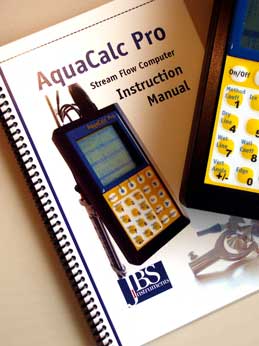
AquaCalc Pro Instruction Manual
Click here to download an Adobe Acrobat version of the AquaCalc Pro Manual. (2 Mb) You may also contact JBS and request a printed version of the manual. This manual includes the new changes in the firmware through version 1.3.x.
Old AquaCalc Pro Firmware Updater
(see above to use the newer AquaCalc DataLink software)
The firmware in the AquaCalc Pro can be updated by the user. (Which firmware do I have?) Each firmware update includes all of the previous version fixes and improvements. You will need to perform the following steps:
- Copy all data from the AquaCalc Pro to your computer using the DataLink program.
WARNING: All Sections and observations in the AquaCalc Pro may be lost when updating the firmware!
- Download the old version of the AquaCalc Pro Firmware Updater version 1.3.7 setup
program from this site by clicking here.
Filename: AQPU_137.zip. - Size 2.00 Mb
- Save the Updater Installer zip file to your computer.
- Open the zip file and run the “setup.exe” program to install the Updater program on your computer.
- The two setup files have been compressed into a “zip” file. In Windows XP and Vista you can open the zip file that you saved to your computer by simply double-clicking on it. Or you can right-click the AQPU_137.zip file and select “Extract All...” from the menu. Older operating systems will need an un-zip program like WinZip.
- When the zip file opens, double-click the Setup.exe file to begin the installation of the Updater firmware to your computer.
- Connect the AquaCalc Pro to your computer using the data communications cable provided with your Pro.
- Run the Updater program by selecting AquaCalc Pro Firmware Updater from the Windows Start Menu in the JBS Instruments folder. Follow the on-screen directions in the Updater.
- After your AquaCalc Pro firmware has been updated, you may remove the Updater software from your computer using the Windows Add/Remove Software function found in the Control Panel.
Note: Older AquaCalc 5000s, both the Basic and the Advanced, cannot use this update. To update your older AquaCalc 5000s click here.
Version History -
Description of Changes in AquaCalc Pro Firmware Updates
Version 1.3.7 -- January 2009 Download
AquaCalc Pro firmware version 1.3.7 - - Filename: AQPU_137.zip (size 607 kb)
Dated 08-18-2008
To Install this version:
- Download the zip file which contains the setup files,
- Use the Add / Remove Software in the Windows Control Panel to remove your old version of the AquaCalc Pro Firmware Updater.
- The setup files have been compressed into a “zip” file and must be extracted before installing. Extract the setup files contained in the zip file to your computer (Windows Explorer can be used to extract files from a zip file by right-clicking on the zip file and selecting Extract All from the menu.
- Run the setup.exe file to install the Updater program.
- Connect your AquaCalc Pro and run the Updater program.
Don’t forget to download your existing measurements from your AquaCalc Pro before updating the firmware in it.
New Manual
A revised manual that includes instruction on the new features listed below is available for download:
AquaCalc Pro Manual for 1.3.7.
You may also contact us and request a new manual be sent to you.
New Features:
1) Ability to delete all observations but leave all vertical information.
When a section is selected in the Sections screen the "Delete" option has been changed to "Delete Sect." (used to delete the entire section) and an additional option has been added: "Delete Obs.". When "Delete Obs." is selected, all of the observation information will be deleted from a section, but section information (gage id, meter info, etc.) and vertical information (individual distance and depth locations) are not deleted. This is useful when measurements are performed from the same tag-line positions each time, such as in pre-marked bridge locations.
2)
0.2 Flood measurement is now enabled.
In the Section Setup Screen when "8) .2 FLOOD" is selected, a line has been added "6) Flood Coef." where a coefficient can be added that applies to all velocities performed at the 0.2 position. When performing flood measurements observations are only made at the 0.2 depth position across the entire section. A flood coefficient is used to adjust the observed velocity to represent the mean velocity. The usual 0.2 depth flood coefficient is about 0.87 but varies by stream. Please see the AquaCalc Pro manual "Performing Flood Measurements".
3)
Copy Horizontal Angle can now be set to copy only in the existing vertical. When 6) Copy Horiz. Angle is selected in the Vertical Setup screen, a second line appears that allows you to
select "7) Same Vert. Only". The Horizontal Angle Coefficient is reset to a value of 1 when a New Vertical is created. This is now the default setting, so if you wish to use the same horizontal angle throughout a section,
you must now turn off this feature.
4) Inverted velocity in vertical warning message.
The AquaCalc Pro now warns the user with an on-screen message when inverted vertical velocities are found. Normal vertical will have higher velocities at the surface. Abnormal verticals may have higher velocities lower. When inverted velocities are found, the user should perform measurements in all three observation location 0.2, 0.6, and 0.8.
Improved Features:
5) "Open Last" now opens the last section and returns to the last vertical in the section instead of the first vertical as in previous versions.
6) Negative Offset values for the Current Meter constants are now allowed. Offset values from -6.0 to + 6.0 are now allowed. In previous versions negative offsets were not allowed.
7) Changed the action of the Enter key in the Measure screen.
Pressing the Enter key accidentally, will not cause you to exit the Measure screen. Use the Menu key to return to the Main menu.
Bug Fixes:
8) Fixed unintentional creation of new sections when the Re-Open Last softkey is used in the Main Menu and no vertical or section information entered. Under certain conditions, empty Sections would be created in previous firmware versions when using the "Re-Open Last" softkey.
Version 1.2.1 -- April 28, 2006 -- Download 1.2.1
Note: This version can also be installed using the Update Installer for version 1.3.7 above.
We recommend this update for users who work in metric units with current meters rated in English/SAE units (feet per second).
1) Fixed problems with metric conversions when using English / SAE rated current meters and measuring in metric units.
Version 1.1.4 -- December 16, 2005
Released 11/17/2005
1) “LEW No” in header output changed to read "LEW"
2) Incorrect hanger bar length when using metric fixed: Now when System Preferences is set to "Metric" the values displayed for the
hanger bar length are displayed in meters. In addition the bar length is adjusted into meters for the depth calculation.
3) Consistent navigation using keypad buttons: Navigation button functions changed to conform to the
following:
-Menu button: Takes the user to the Main Menu Screen.
-Measure button: Takes user to the Measure screen
-Enter button: Moves up / back one level in hierarchy.
(Exception: when the user presses ENTER from Section Setup or Vertical Setup Menus, they will be returned to the Measure Screen instead of to the Setup Screen.)
-Esc button: Not used in navigating through menus or
screens. Used to cancel the entry of numbers and text and restore previous values when performing data entry. Values are displayed as "reversed" text light on a dark background when this function is available.
4)
Replaced "1 of 2" with “More” and “2 of 2” with “Back” in soft-key menus.
Version 1.1.3 -- January 23, 2004
Note: The version Updater was released in September of 2004.
1) Display contrast setting in Preference Menu is saved. Once you have selected a display contrast level in the Preference menu it will be the default setting until changed.
2) Lighter contrast extended for hotter weather (Pro
should be kept in shade). The range of contrast control in the graphic display has been changed and extended to accomodate the changes made by the manufacture of the display.
3) Preferences Keypad Beep saved.
4) Entries for
the Staff Heigh and the Gage Height have been extended from 99 to 9999 ft.
5) Change of Output file to Output version 1.5 due to item 4
Version 1.1.2 -- Not Released
Version 1.1.1 -- June 16, 2003 --
1) Erase Obs now sets Horizontal Coefficient equal to 1.0.
2) If all sections full, the AQP will not enter the Measure Mode and signals the user to delete sections.
3) Section Data is saved every time a new vertical is created.
4) Addition of nonstandard meters
Version 1.1.0 -- Not Released
Version 1.0.9 -- April 4, 2003 -- Not Released
1. bug fixed: assembly date
2. bug fixed: Depth prompt when using cable
3. feature: Optical meter selections added to meter list
Version 1.0.8 -- January 30, 2003 --
Version AQP-1V1.0.8
Dated 01-30-03
Summary: This update fixes the rounding problem when summing the subsection values and calculating the totals.
Problem: When summing the subsection values a rounding error was occuring with the totals.
Status: Rounding modified to meet the letter provided by Kirk Thibedoux of the USGS-HIF
Version 1.0.7 -- November 22, 2002 --
Version: "AQP-1V1.0.7";
File Version: "V1.4";
Date 11-22-02
Firmware mods
-------------------------------------------------------------------
(1) Low battery check disabled during power-down
(2) Enter key to return from "Meas > Setup" menu
(3) Enter key to return from "Meas > Setup > Vertical Setup" menu
(4) Elapsed time for measuring entire Section calculated
(5) Insert Vertical moves to Inserted Vertical
File download mods (File Version: "V1.4")
-------------------------------------------------------------------
(1) Elapsed time for measuring entire Section x.xx hours added to header data (NA if dates aren’t equal)
(2) vertical area increased to 100th
Version 1.0.6 - (Not Released)
AquaCalc Pro 1.0.6
Date: 10-11-02
Additions to the AquaCalc Pro Firmware in Version AQP-1.0.6
1. Horizontal angle calculation in the download has been corrected. In the downloaded file the output displayed both
the horizontal angle "HA" and the cosine coefficient (HC) of the horizontal angle "HC:VF" were incorectly displayed.
The horizontal angle coefficient was always correctly displayed and correctly adjusted the velocity. However, the horizontal angle HA was not correctly represented in the output creating confusion.
2. Observation "Time Stamps" are now included on all observations including walls and edge of water.
3. Additional entry in the sounding weight list "User 0.00", allows the user to use any sounding weight without the
hanger bar adjustment being automatically added to the depth. The value of the sounding weight on the output is a blank "_____".
4. Measurement syncronization problem has been enhanced.
5. Meter setup table protected from accidently editing an existing nonstandard meter.
Version 1.0.5
- >modifications:
- Fixed Auto power-down lock-up
- Fixed Swap Observation Data Command from lock-up
- >Features added:
- Measure screen includes "Prev.Vert. %Q: x.xx on display line 14
- Allows user view %Q of previous vertical.
Version 1.0.4
Not released
- >modifications:
- User entry of staff gage height
- Return to Section Setup Menu after Meter Select key is pressed
Version 1.0.3
- >Features added:
- Meter setup menu for 10 meters
- Swap Observation
- >Modifications:
- Date and Timestamps changed per request
- Text entries are now left justified
- >Output additions:
- Meter Revs/Pulses ratio added
- Meter type added
- Meter std added
- HEX byte 1A added to end of upload file
- 1. Measure time from 0-250 seconds properly displayed
- 2. Error beep when invalid Meas. Options are pressed
- 1) FIX: PAA max depth set to 0.00
Version 1.0.2
- Addition of meter edit screen
- Changed:
- Display Rev and Time
- Added Move Observation
- Fixed Escape Keys
- Left Justify Text Entry
- Fixed rounding problem
- Redid Escape keys
- Added Quality to the output screen with menu item
Version 1.0.1
- Addition of meter edit screen
- Changed:
- Display Rev and Time
- Added Move Observation
- Fixed Escape Keys
- Left Justify Text Entry
- Fixed rounding problem
Version 1.0.0
Initial Release
AquaCalc LLC is pleased to offer an improved version of the discontinued AquaCalc Pro Discharge computer:
the AquaCalc Pro Plus. All the same features of the the industry standard AquaCalc Pro,
Plus:
- A USB connection that allows automated downloading of AquaCalc measurements.
- Rechargeable and field replaceable NiMh AA batteries that charge using the USB connection.
- A battery meter that gives the percent of battery charge remaining.
- An improved user interface that makes navigation and review easier.
- Automated downloading of measurements using the newly redesigned and improved AquaCalc DataLink 3 program
- A completely new and redesigned RoHs compliant circuit board with additional program space for more features.
- An optional Bluetooth module for wireless transfer of measurements to compatible devices.(Available later in the year.)
Use the New AquaCalc DataLink to Update your older AquaCalc Pro firmware!
The AquaCalc DataLink includes the firmware updater for the AquaCalc Pro Plus, and allows you to view and print reports from the AquaCalc Pro.
We recommend that you use the Updater in DataLink to update your older AquaCalc Pro.
Click here to Download the new AquaCalc DataLink.
Need Accessories or Cables?
We have replacement parts and cables for the AquaCalc line of stream flow computers including the Digital Pygmy Magnetic Head retro fit your old Pygmy Current Meter with a new digital magnetic sensor.